Pending
A valid identity creates a request; ordinary Internet remains blocked.
Implementation candidate · managed-site validation required
A valid enrolled identity can request access. The business authorizes that individual device at its location before ordinary Internet access is granted.
A valid identity creates a request; ordinary Internet remains blocked.
The business authorizes that individual identity at its location.
Confirm authentication, fresh reports and gateway acknowledgement.
Target supported hardware and an enabled site. Your application retains its own health and recovery responsibilities.
The business sees a verified manufacturer, product, device identifier, requested role, and recent attempt. Manufacturers see that their device is waiting for approval.
Repeated attempts refresh a single request instead of producing duplicate requests. Invalid or unknown credentials do not appear as trusted manufacturer requests.
Approval persists across reconnects for the same identity and site until revoked. Credential renewal and a MAC change do not create a new device identity. A different location requires permission there.
Revocation removes site authorization and requests disconnection. Enforcement remains pending until the reachable gateway acknowledges it. A dashboard decision alone is not proof that an unreachable router has applied it.
Power on an enrolled, compatible satellite within gateway range and approve it in the dashboard. The ordinary installation path needs no mandatory QR scan, network password entry, cable connection, BSSID entry, or SSH session.
After approval, confirm secure backhaul, applied configuration, active client Wi-Fi, and recent reporting. Reposition the satellite only while it retains an adequate backhaul signal. Legacy satellites require deliberate reprovisioning.
Permission does not claim or transfer ownership. A manufacturer cannot override a business denial. Provider delegation does not automatically grant site admission.
A functioning gateway and Internet uplink are required. Offline commissioning and multi-hop mesh are outside the initial supported experience.
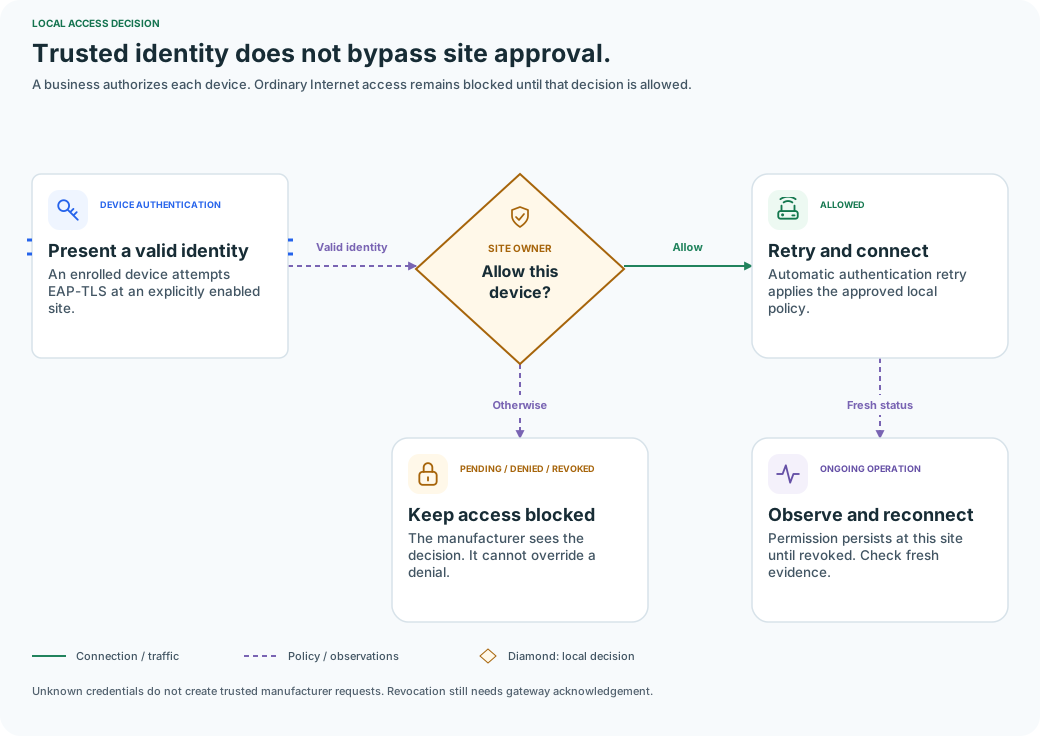
An enrolled device attempts EAP-TLS at an explicitly enabled site.
The business reviews the individual connection request.
Automatic authentication retry applies the approved local policy.
The manufacturer sees the decision. It cannot override a denial.
Permission persists at this site until revoked. Check fresh evidence.