Minimal installation steps
The normal installation flow needs no Wi-Fi password entry, mandatory QR scan, manual BSSID setting, or SSH session.
Implementation candidate · managed-site validation required
Extend a supported site with an enrolled satellite, a clear business-approval step and visible installation states. Give your team a defined workflow from first power-on to confirmed backhaul and client Wi-Fi.
The normal installation flow needs no Wi-Fi password entry, mandatory QR scan, manual BSSID setting, or SSH session.
See approval, backhaul connectivity, access-point activation, Internet reachability, and recent reporting separately.
Each business decides which individual devices may use its site. Network permission does not transfer ownership.
Adding coverage also adds equipment to install and support. The managed-satellite workflow gives a supported unit its own identity, a clear approval step and separate evidence for backhaul, client Wi-Fi and Internet reachability.
Aim for fewer installation decisions and a clearer handoff to support.
Supplies the managed network and upstream Internet connection.
Joins with an individual identity and restricted encrypted backhaul.
Check applied configuration, AP activation and recent observations.
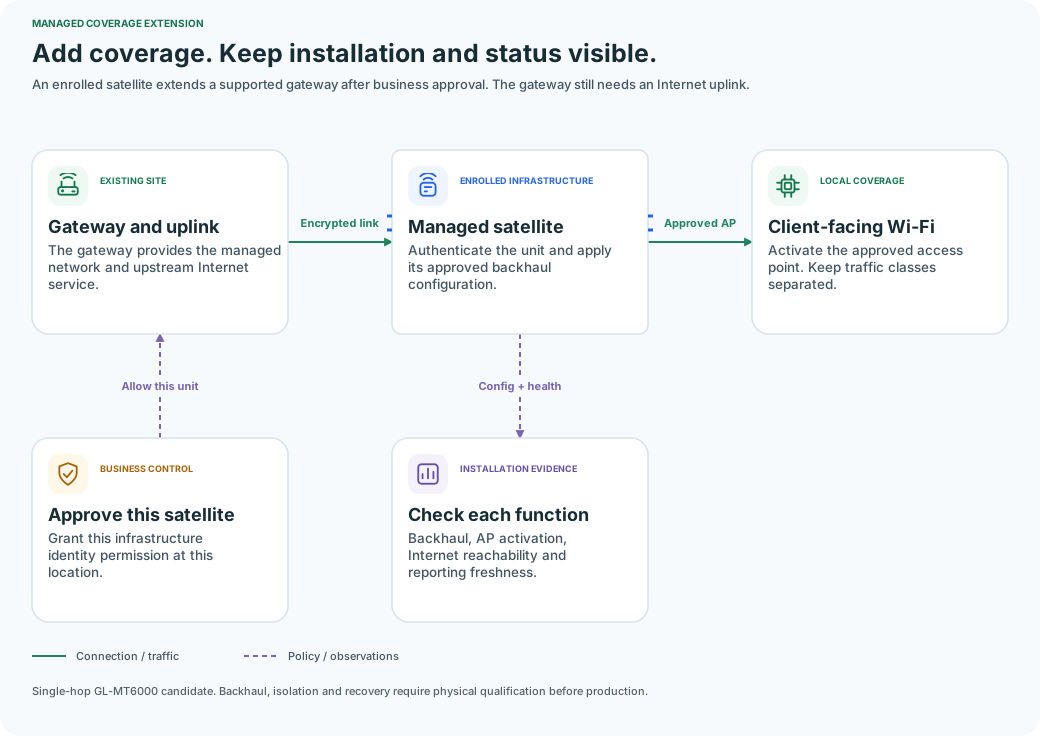
The gateway provides the managed network and upstream Internet service.
Authenticate the unit and apply its approved backhaul configuration.
Activate the approved access point. Keep traffic classes separated.
Grant this infrastructure identity permission at this location.
Backhaul, AP activation, Internet reachability and reporting freshness.
Newly managed satellites need an enrolled infrastructure identity and compatible signed software. An existing legacy satellite is not silently converted.
A satellite may have a working backhaul while the site’s Internet connection is down. It may also be connected but not yet applying the expected access-point configuration.
The dashboard reports each observed state with a freshness timestamp. Missing reports become unknown instead of remaining green indefinitely.
The first implementation targets single-hop GL-MT6000 gateway-to-satellite deployments. Encrypted backhaul, enterprise authentication, network separation, and recovery require physical qualification before production availability.
Multi-hop mesh and arbitrary third-party range extenders are outside the initial release. A satellite requires a functioning gateway and upstream Internet service.
Software implementation candidate. Physical router and device qualification is pending. IoT network features are disabled by default, and production activation is reviewed by HotSpotVU. Authorized sandbox trials use a bounded service-admin test window; this does not establish production qualification.
Existing guest connectivity remains separate. New IoT and managed-satellite network features are enabled deliberately per qualified site.
Start on supported Linux/OpenWrt hardware at an authorized HotSpotVU site. The business keeps control of network access. Production activation follows review; external OpenRoaming availability follows separate validation.