Provision at the factory
Create one product and install one individual device identity.
Implementation candidate · managed-site validation required
Use one compatible Linux/OpenWrt device, a qualified test gateway, and a site where you have permission to run the evaluation. Network functionality is disabled until that test site is explicitly enabled.
Create one product and install one individual device identity.
The business allows the enrolled device before ordinary Internet access.
Test fresh reports, reconnects, renewal and permission removal.
Target supported hardware and an enabled site. Your application retains its own health and recovery responsibilities.
Have an authorized administrator create your sandbox account and issue a scoped partner token for product creation, enrollment, credential issuance, and reading status. The default sandbox allows ten devices and one authorized site. Keep this token on trusted provisioning systems.
Use a Linux development workstation with Python 3.10 or newer, OpenSSL, curl, and unzip. The device needs EAP-TLS-capable wpa_supplicant, wpa_cli, OpenSSL, protected storage, reliable time, and DHCP. A HotSpotVU operator must explicitly enable the test site; hardware validation remains a manual operator step.
Set HOTSPOTVU_API to your assigned HTTPS service origin without an /api suffix and inject HOTSPOTVU_IOT_TOKEN from your secret manager. Network connectivity is needed during factory enrollment, before shipment.
# Run on a trusted Linux development/provisioning workstation.
# Set HOTSPOTVU_API to your assigned HTTPS service origin (no /api suffix).
# Supply HOTSPOTVU_IOT_TOKEN from your secret manager; do not paste it here.
curl --fail --silent --show-error --proto '=https' \
  "$HOTSPOTVU_API/iot/connectivity-kit.zip" -o connectivity-kit.zip
unzip connectivity-kit.zip -d hotspotvu-kit
python3 -m venv .venv
. .venv/bin/activate
python3 -m pip install ./hotspotvu-kit/sdk/python
hotspotvu-connect --helpCreate a product once for this device model, or reuse a product UUID from your manufacturer dashboard. Save the id from the HTTP 201 response as HOTSPOTVU_PRODUCT_ID; the response is a product object, not a data wrapper.
curl --fail --silent --show-error \
  --request POST "$HOTSPOTVU_API/api/iot/v1/products" \
  --header "Authorization: Bearer $HOTSPOTVU_IOT_TOKEN" \
  --header "Accept: application/json" \
  --header "Content-Type: application/json" \
  --data '{"name":"Temperature sensor","platform":"Linux","category":"sensor"}'
# HTTP 201 returns the product object directly.
# Save its id as HOTSPOTVU_PRODUCT_ID before the enrollment step.Use the API contract at OpenAPI contract for actual operation names and request fields. The hotspotvu-connect CLI provides keygen, enroll, configure, run, status, and renew commands. Do not substitute a shared fleet certificate for individual device credentials.
Run this once for each unit in your trusted manufacturing environment. The CLI performs the registry, key, CSR, certificate, and profile steps above. A privileged process may be needed for /etc/hotspotvu-connect. A workstation-generated directory must be securely transferred to its intended device only.
Do not replace a provisioned directory with another device’s files. Preserve the external ID for retries: the server deduplicates enrollment by account and external ID; conflicting product or batch associations return 409.
# Requires Python >=3.10, OpenSSL, and a protected per-device directory.
umask 077
hotspotvu-connect enroll \
  --base-url "$HOTSPOTVU_API" \
  --product-id "$HOTSPOTVU_PRODUCT_ID" \
  --external-id SENSOR-0001 --name "Temperature sensor 1" \
  --directory /etc/hotspotvu-connect
hotspotvu-connect configure --directory /etc/hotspotvu-connect
# Output from enroll: {"device_id":"<UUID>","credentials_installed":true}
# The private key stays local. Only the CSR is submitted for signing.
# The partner token belongs only in this factory environment.
# Exclude it from the shipped device image.On the device, install the adapter and full EAP-TLS supplicant. Configure DHCP with your existing network manager, then enable the Wi-Fi and reporting services. Do not let two managers control wlan0.
Power on within range of the authorized gateway. Before business approval there is no ordinary Internet service. The business allows the individual request in its dashboard; the device then retries authentication automatically.
Use the trusted backend example to read /requests. Expect pending / awaiting_approval first; after approval and a fresh device report, expect allowed / connected with the applicable Internet check. Registry state=active alone does not establish connectivity.
Reboot and reconnect without approving again. Renew the credential without changing the stable device identity. Revoke site permission and confirm enforcement is acknowledged by the gateway.
Interrupt the site uplink and check that stale telemetry becomes not_reporting. Confirm that application reachability is not inferred from Wi-Fi authentication alone.
import os
from hotspotvu_connect import Client, ApiError

api = Client(os.environ["HOTSPOTVU_API"], os.environ["HOTSPOTVU_IOT_TOKEN"])
try:
    for device in api.pages("/devices"):
        # state is registry lifecycle (active/revoked), not Wi-Fi status.
        print(device["id"], device["state"])
    for request in api.pages("/requests"):
        status = request["status"]
        print(request["endpoint_id"], status["authorization"],
              status["connection"], status["internet_reachable"],
              status["last_confirmed_at"], status["fresh_until"])
except ApiError as error:
    # Log the status, never the token or a credential bundle.
    print(f"HotSpotVU request failed: HTTP {error.status}")
raise{
"authorization": "allowed",
"connection": "connected",
"internet_reachable": true,
"ap_active": null,
"last_confirmed_at": "2026-10-28T12:00:00Z",
"fresh_until": "2026-10-28T12:01:30Z",
"enforcement": "applied"
}Submit a production application identifying your platform, expected device count, provisioning approach, and support requirements. Sandbox success does not automatically activate production or external roaming.
Software implementation candidate. Physical router and device qualification is pending. IoT network features are disabled by default, and production activation is reviewed by HotSpotVU. Authorized sandbox trials use a bounded service-admin test window; this does not establish production qualification.
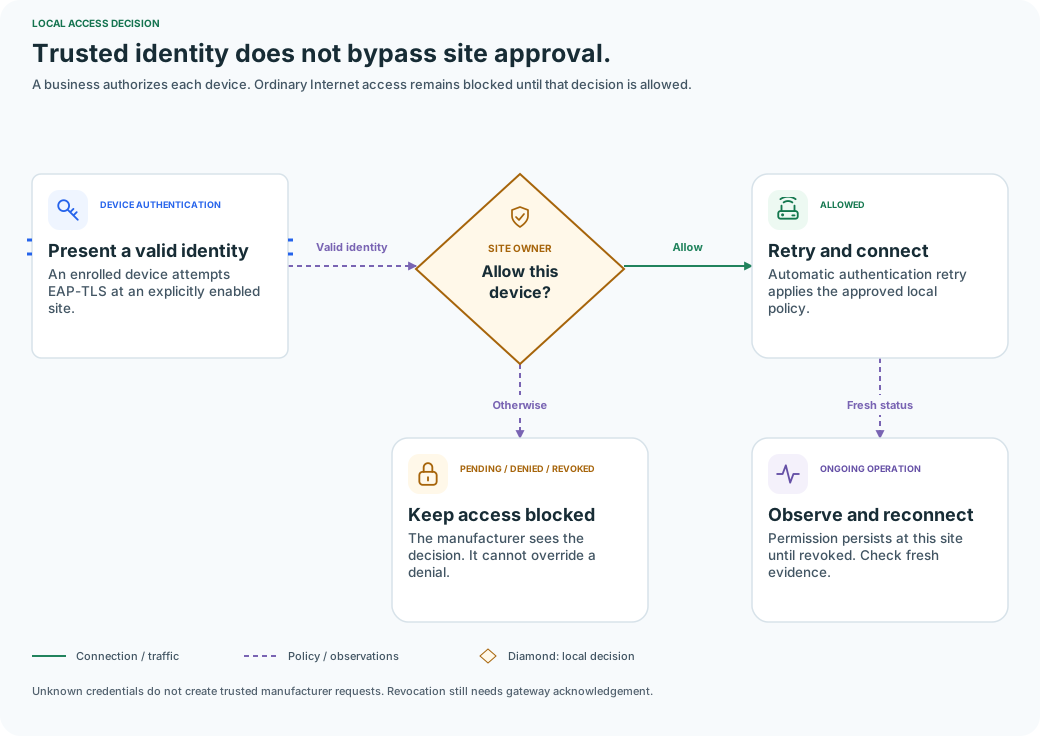
An enrolled device attempts EAP-TLS at an explicitly enabled site.
The business reviews the individual connection request.
Automatic authentication retry applies the approved local policy.
The manufacturer sees the decision. It cannot override a denial.
Permission persists at this site until revoked. Check fresh evidence.